SRS Networks

Enterprise sales • Multi-site deployment

Active deterrence systems.
Built around your sites.

Buy mobile surveillance units, fixed and pole-mounted systems, or upgrades for compatible cameras. SRS coordinates equipment and deployment across your enterprise portfolio.

Companywide infrastructure experience. These totals cover SRS programs across service lines; they are not active-deterrence deployment totals.

1996

Founded

900+

Companywide programs

10,000+

Companywide sites

6

Offices

Turn a detected event into an agreed response

Active deterrence combines detection with actions such as a recorded warning, operator voice-down, or visible lighting. The response depends on the equipment, configured rules, and assigned operator. SRS scopes the system and field deployment so buyers can test that sequence before expanding it.

SRS Networks is a nationwide IT infrastructure deployment partner headquartered in South San Francisco, California, serving multi-site enterprises across the 48 contiguous states, Alaska, and Hawaii since 1996. Our 30 years in business, 6 offices across 4 states, and West Coast and East Coast staging facilities support coordinated field delivery.

Anonymized ADU deployment experience

Employee parking lots at 24/7 produce manufacturing facilities

SRS Networks has deployed active deterrence (ADU) systems at several produce manufacturing facilities to monitor employee parking lots in support of safety and security. These facilities operate 24/7.

The deployment experience covers employee parking areas at facilities with round-the-clock operations. Customer names and site locations remain private.

Camera installation and infrastructure field records

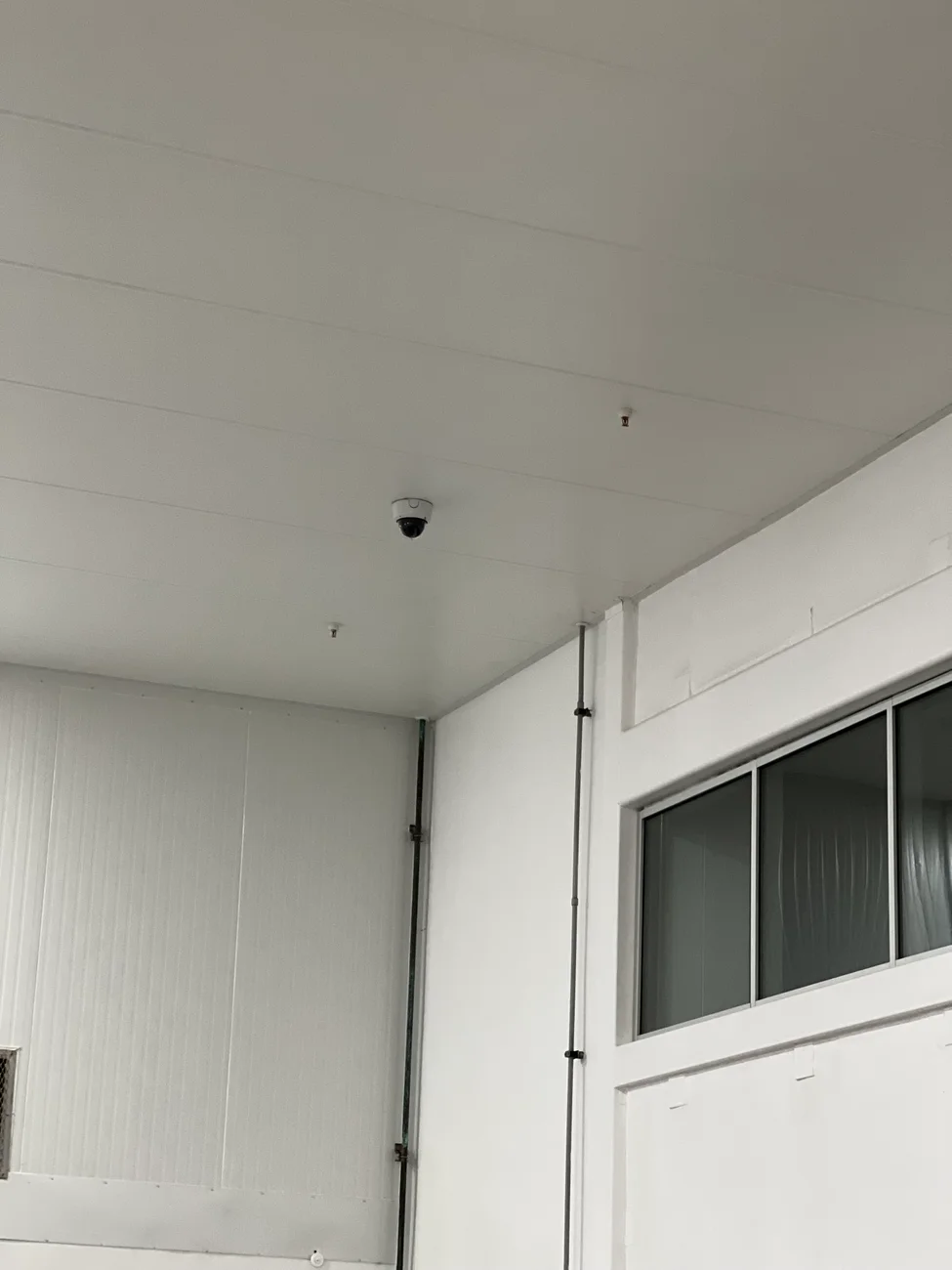
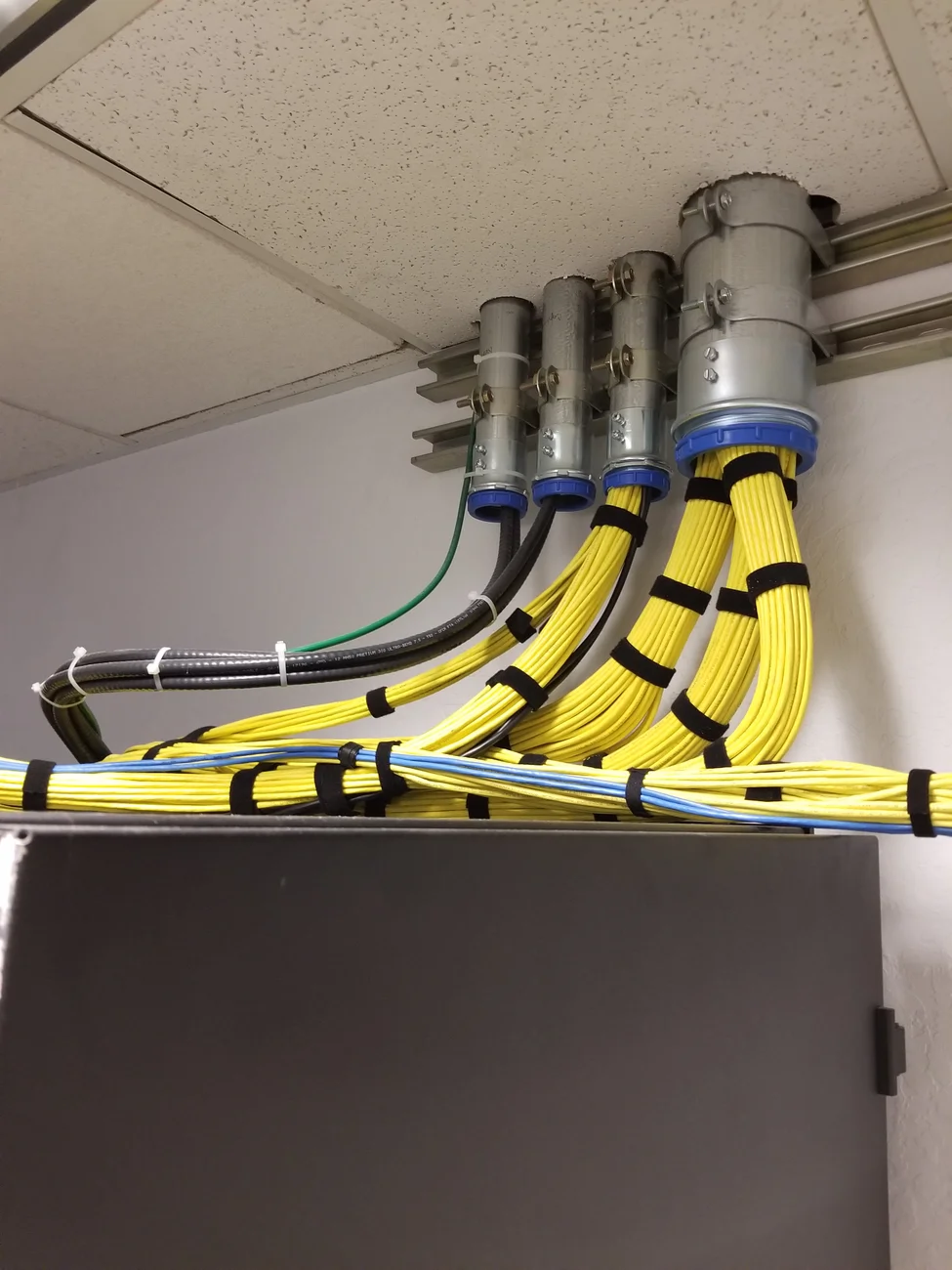
Project materials include camera coverage drawings for shipping, receiving, production lines and mezzanine areas, along with exterior camera and wireless access-point planning. Selected field photographs below show an installed interior dome camera and a cable-entry detail.

Field photograph of an interior dome camera mounted on a paneled ceiling
Installed interior dome camera. The photograph records the mounting detail; no camera model, environmental rating or acceptance-test result is asserted.
Field photograph of bundled cables entering conduit above an equipment cabinet
Cable-entry detail from a separate field photograph: bundled cabling and conduit entries above an equipment cabinet. Shown as related infrastructure work, without assigning it to the parking-lot deployments.

These photographs document camera and infrastructure details. They do not show the parking-lot ADU systems described above or establish warning functions, monitoring arrangements or measured security outcomes.

Anonymized deployment example · infrastructure scope

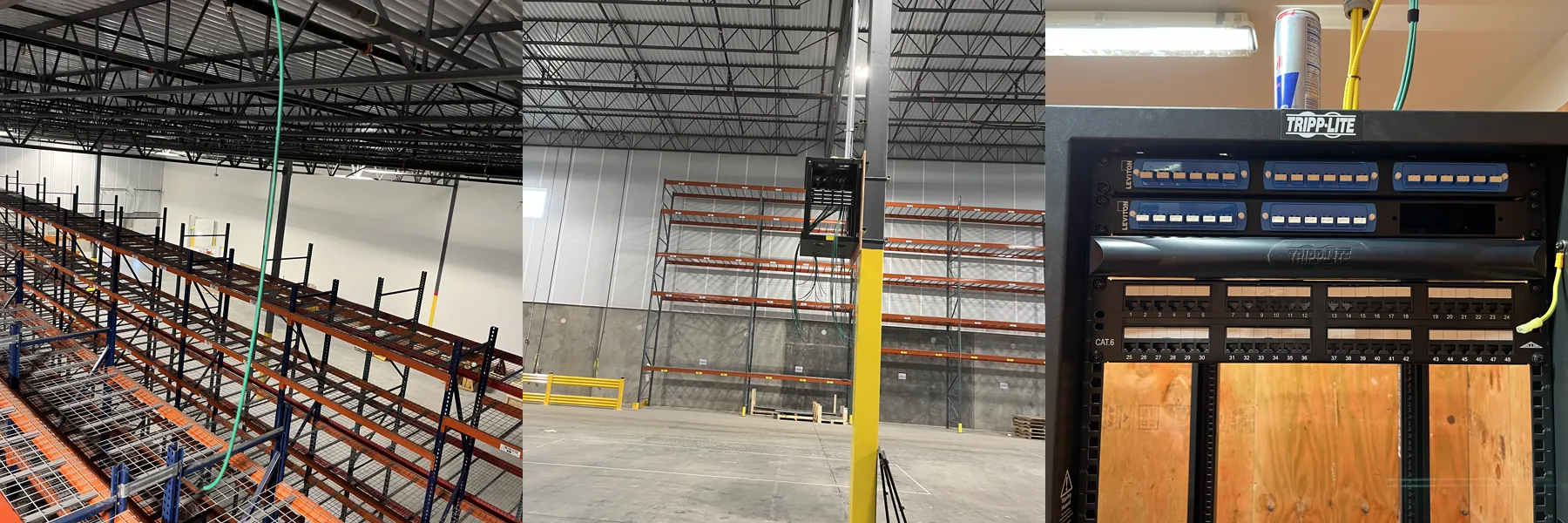
Warehouse cabling: visible evidence of the field work

SRS's released warehouse field record documents overhead cable pathways, MDF and IDF communications spaces, copper patch-panel termination, and fiber management. Customer identity and site location remain private.

Why it matters to a security rollout

Fixed and retrofit systems may depend on the same categories of pathways, communications racks, and network cabling. This example lets buyers inspect related infrastructure work when evaluating the field portion of their deployment.

What this example establishes

The evidence covers visible cabling and rack work. It does not establish an active-deterrence installation, camera or warning performance, monitoring service, crime reduction, or certification test results. No project quantities, schedule, savings, or customer quotations are claimed here.

Review the released warehouse field evidence

One enterprise program, clear responsibility at every step

Your portfolio may combine a mobile pilot, permanent perimeter equipment and existing-camera upgrades. SRS coordinates the site survey, equipment and field scope, then carries approved configurations into site waves with readiness gates and reviewable closeout.

SRS integrates Axis Communications, Dahua Technology and VIVOTEK camera systems. We assess the exact models, firmware, VMS and required functions before confirming an active-deterrence design.

  1. Detect

    The selected camera or analytic produces an event.

  2. Evaluate

    An approved rule or assigned operator evaluates it.

  3. Deter

    A configured message, light or live voice-down responds.

  4. Escalate

    The named response provider follows the agreed process when included.

Match the equipment to the property

Retail portfolios, property owners, logistics teams, and enterprise security departments can combine these approaches within one program.

Mobile surveillance units

Put coverage where the work is changing. Use mobile equipment for temporary properties, construction phases, seasonal exposure, or a pilot before permanent work.

Qualify placement, access, power, connectivity, and relocation needs.

Fixed and pole-mounted systems

Plan lasting coverage for parking lots, building approaches, loading areas, and yards. Coordinate cameras, audio, lighting, mounting, and the infrastructure beneath them.

Survey sightlines, pole suitability, electrical supply, and network paths.

Retrofits for existing cameras

Add audio and visual deterrence where existing equipment supports the required workflow. Start with the cameras and VMS you have, then identify what can stay and what must change.

Validate models, interfaces, event triggers, power, and response-provider support.

Move from a representative pilot to coordinated deployment

STEP 1

Assess the portfolio

Group sites by property type, existing equipment, access, and exposure. Identify the budget owner, security operator, and IT approver before equipment selection.

STEP 2

Prove the pilot

Test representative configurations and agree coverage, response behavior, and acceptance evidence. Record exceptions before repeating the design.

STEP 3

Deploy in waves

Coordinate equipment staging, site contacts, field work, and configuration handoffs. Track readiness and changes through the Project Command Center.

STEP 4

Accept each site

Review test results, equipment records, photos, and outstanding items. Confirm the operating handoff and assign ownership for support after acceptance.

See how multi-site deployment tracking and site photo documentation support a reviewable handoff.

Know what your quote includes

We scope equipment and field work together, then identify recurring services separately. Site-specific electrical work, network extensions, access equipment, and operating requirements belong in the budget before dispatch.

Automated warnings, staffed monitoring, and live voice-down have different responsibilities. The proposal names the operating arrangement and any response provider; purchasing hardware does not automatically include a staffed monitoring service.

Commercial terms, equipment availability, warranty coverage, and ongoing service are confirmed in the quote. This offer is intended for enterprise properties and coordinated deployments; household camera purchases belong with a residential provider.

Define acceptance before the first site

  • Approved placement and coverage checks
  • Tested detection, audio, and lighting sequence
  • Power and connectivity verification
  • Recorded exceptions and correction ownership
  • Equipment records, site photos, and operating handoff

These are planning criteria. Final tests follow the selected system and agreed scope.

Sample rollout deliverables

See what a reviewable deployment produces

Example portfolio: three pilot sites covering mobile, fixed, and retrofit configurations, followed by a repeat-site wave. Dates are relative planning days, not a delivery commitment. Evidence IDs below demonstrate the record structure; they do not link to actual project files.

ILLUSTRATIVE SAMPLE — fictional sites and records, not a customer deployment

Four pages · Version 1.0 · October 2026 · No form required. Fillable fields are for your planning notes; examples stay clearly marked.

Sample site-readiness matrix

Snapshot at Day 5. Ready means evidence reviewed; Hold means no dispatch; N/A needs an approved reason. The program manager releases a site only after every applicable gate is ready.

Illustrative sample · fictional records

Sample site-readiness matrix — illustrative sample, fictional records
Site / configurationDesign / approvalsPower / networkAccess / kitRelease / owner
SITE-001 · mobile pilotReady · placement plan D-001; property approval A-001Ready · selected-unit power assessment P-001; cellular test N-001Ready · receiving contact and kit K-001Ready for pilot · program manager · Day 6
SITE-002 · fixed pilotReady · mounting review D-002; approval register A-002HOLD · permanent supply verification P-002 missing; network readyReady · work window and kit K-002HOLD · facilities lead · evidence due Day 8
SITE-003 · retrofit pilotReady · model, firmware and event-path bench test D-003Ready · capacity and connection checks P-003 / N-003Ready · operator witness and kit K-003Ready for pilot · program manager · Day 7
SITE-004 · fixed repeatHOLD · approved repeat design follows SITE-002 pilotHOLD · site survey not completeHOLD · kit release awaits approved designUnscheduled · site lead · review Day 15
  • Each site record also names the property approver, facilities lead, IT approver, field lead and operating/response provider. Store their contacts in the project channel.
  • A release review checks placement and coverage, required permissions, power, connectivity, compatibility, equipment, access, response ownership and rollback arrangements. A percentage-complete score cannot override a hold.
  • Mobile: validate placement, relocation access and selected-unit power/connectivity. Fixed: validate mounting, pathways and permanent supply. Retrofit: validate the exact camera/VMS versions and required functions.

Sample pilot acceptance checklist

Day 12 review of SITE-001 through SITE-003. Agree test methods, measurable thresholds and witnesses before testing. The example results below are fictional; project requirements determine the actual pass criteria.

Illustrative sample · fictional records

Sample pilot acceptance checklist — illustrative sample, fictional records
CheckAcceptance evidenceSample result / owner
Coverage in agreed conditionsApproved zones, day/night observations and image references match the signed test plan.PASS · T-01 · security lead
Detection and intended warningWitness the configured trigger, correct zone, audio/light action and event timestamp; compare to approved limits.PASS · T-02 · commissioning lead
Operator event pathNamed response provider receives the event and demonstrates acknowledgment/voice-down when included in scope.HOLD · T-03 · SITE-003 return-audio test failed; platform lead
Nuisance events and exclusionsRun the agreed non-target scenarios; log observations against the approved tolerance and privacy zones.PASS · T-04 · security lead
Power / connectivity / recoveryUse an authorized test window; record loss indication, restoration and recovery against the selected design.PASS · T-05 · facilities + IT
Recording and user accessCheck agreed retention settings, playback/export, time synchronization and role access without sharing credentials.PASS · T-06 · IT approver
Training and support handoffOperator completes the agreed demonstration; support route and escalation owner are recorded.PASS · T-07 · operations lead
Defects, retests and releaseLink each failed test to a defect, corrective action, retest and approval; do not expand affected configurations.HOLD · D-01 / T-03R pending · program manager
  • Sample decision: hold portfolio wave release at Day 12. Platform lead owns D-01, correction and witnessed retest are planned for Day 13, and the security owner reviews release on Day 14. A planned retest is not a pass.
  • Use Pass, Fail, Hold or approved N/A with reasons. Critical defects must be resolved before release. Any permitted minor exception needs an owner, due date and explicit acceptance; it cannot silently become complete.

Sample installation schedule

Illustrative sequence for the same four sites. Day numbers are working-day planning slots with no calendar commitment. Confirm durations, equipment lead times, crew capacity, work windows and local time zones before baseline approval.

Illustrative sample · fictional records

Sample installation schedule — illustrative sample, fictional records
WindowActivity / accountable ownerDependency / release evidence
Days 1–3Survey and scope · site leads + design leadSite access confirmed; collect placement, infrastructure, operating and approval requirements.
Days 4–5Approve pilot design and stage kits · program managerReviewed drawings/BOM, compatibility checks and received kits; SITE-002 remains on hold.
Days 6–7Install mobile SITE-001 and retrofit SITE-003 · field leadIndividual readiness release; operator and IT booked; end-of-shift condition recorded.
Day 8 review / Day 9 reservedResolve supply hold; fixed SITE-002 installation · facilities / field leadP-002 must be accepted before dispatch. If not accepted, move the reserved slot and notify the program manager.
Days 10–12Witness all pilot tests · commissioning + security leadsInstallations complete and test plan approved. Day 12 sample review holds release for D-01.
Days 13–14 reservedCorrect, retest and review pilot release · platform / security leadsT-03R must pass and revised work instruction must be approved. Dates alone do not release the wave.
Day 15 onward · uncommittedReview repeat-site wave and SITE-004 · program managerPilot release plus SITE-004 readiness required. Assign installation dates only after both gates pass.
  • Daily handoff: site ID, planned versus completed work, test evidence, current condition, open issue, next owner and next confirmed window. Capture photos against the approved shot list.
  • If a prerequisite slips, record the impact, protect the site, and obtain an approved revised window. Keep the original baseline and change reference; never quietly mark a missed installation complete.

Sample closeout package

Example index for SITE-001 after its individual acceptance. This site-level example does not clear the separate SITE-003 pilot hold. Files listed here are illustrative names, not actual customer documents.

Illustrative sample · fictional records

Sample closeout package — illustrative sample, fictional records
Folder / example recordContents / reviewer
00-Index / SITE-001-register-r1.pdfSite ID, revision, file inventory and submission/acceptance status · program manager
01-Design / SITE-001-as-built-r1.pdfApproved placement, device labels, coverage zones and changes from design · design lead
02-Assets / SITE-001-inventory-r1.pdfModel, serial, firmware, asset ID, license/support references and warranty terms · asset owner
03-Installation / SITE-001-photo-log-r1.pdfLocation-tagged placement, mounting and labeling photos; relevant field test records · field lead
04-Tests / SITE-001-test-register-r1.pdfApproved methods, results, witnesses and evidence references T-01 through T-07 · security + IT
05-Exceptions / SITE-001-issues-r1.pdfDefect history, retests and any accepted exceptions with owners and dates · acceptance owner
06-Operations / SITE-001-handoff-r1.pdfOperator training acknowledgment, response ownership, service contacts and secure credential-transfer reference · operations
07-Acceptance / SITE-001-release-r1.pdfSeparate physical-work, technical-test and operating-handoff decisions; customer acceptance and date · designated approvers
  • Sample status: SITE-001 package submitted, reviewers accept revision 1, and its issue register contains no open items. The portfolio register still shows D-01 at SITE-003 as open. Site and program acceptance are distinct.
  • Store the real package in the customer-approved repository with controlled access and revision history. Include only a secure-transfer receipt/reference for credentials, never passwords or access codes in this package.

These planning samples illustrate documentation structure. The proposal and approved project plan define the actual deliverables, responsibilities, acceptance criteria and schedule.

Start with your site list and target schedule

Share your company, site count, states, property types, and the problem you need to address. Include existing camera and VMS details when available. We can begin with a pilot group while the remaining sites are assessed.

Preparing your requirements? Use the site survey planning checklist to organize infrastructure information.

Answers for enterprise buyers

What active deterrence security systems does SRS sell?

SRS offers mobile surveillance units, fixed and pole-mounted systems, and retrofits that add deterrence to compatible cameras. Enterprise buyers can combine these options across a portfolio. Equipment, installation, configuration, and any recurring services are identified in the project quote.

Can we use different deployment types across our locations?

Yes. A temporary site can use mobile equipment while an established property receives a fixed installation and another site retains compatible cameras. We group sites by conditions, validate the proposed configurations, and coordinate deployment against one acceptance checklist.

Can active deterrence work with our existing cameras and VMS?

Compatibility is assessed by camera model, firmware, video management system, analytics, audio interfaces, power, and response workflow. Existing video access alone does not prove that alerts, speakers, and lights will operate together. The proposed event-to-response sequence is tested before extending it to additional sites.

When should we choose mobile surveillance units?

Mobile units suit temporary properties, changing coverage needs, and sites where a permanent installation is premature. Placement, access, power, connectivity, and the intended deployment period still need assessment. Solar, battery, and cellular arrangements depend on the selected equipment and site conditions.

Can you install deterrence equipment on existing light poles?

We assess pole suitability, mounting, access, electrical availability, and the network path before specifying equipment. Switched lighting circuits may require an engineered power and charging arrangement. Pole reuse, battery runtime, and avoided trenching are confirmed for the site rather than assumed.

Who monitors alerts and performs live voice-down?

Automated messages, operator-triggered audio, and live voice-down are different response arrangements. The proposal identifies the operator or monitoring provider, supported functions, escalation responsibilities, and any recurring charges. An equipment or installation purchase does not automatically include staffed monitoring.

What determines the cost of a multi-site deployment?

The main drivers are equipment configuration, site access, mounting, electrical and network work, commissioning, and deployment coordination. Budget comparisons should also include applicable software, cellular data, monitoring, maintenance, and relocation charges. We separate repeatable site scope from exceptions so procurement can compare the same deliverables.

What information should we send for an enterprise quote?

Send your company, site count, states, property types, security concern, and target schedule. Existing camera and VMS details are helpful if available; they can follow during assessment. Start with a representative site or pilot group and identify who will approve coverage, response behavior, and acceptance.

Where does SRS deliver enterprise deployments?

SRS serves the 48 contiguous states, Alaska, and Hawaii. Site readiness, equipment availability, access windows, and local work requirements determine the deployment schedule. A portfolio plan groups sites into workable phases and records exceptions before dispatch.

Build the right deployment mix for your portfolio

Request a quote for mobile, fixed, retrofit, or a combination. Include your deployment window so the sales team can scope equipment and field work together.