
Full Visibility Into Every Deployment, Everywhere
The SRS Networks Project Command Center gives enterprise clients a real-time window into their nationwide rollout - live site status, technician activity, photo documentation, and automated progress reports, all in one platform.
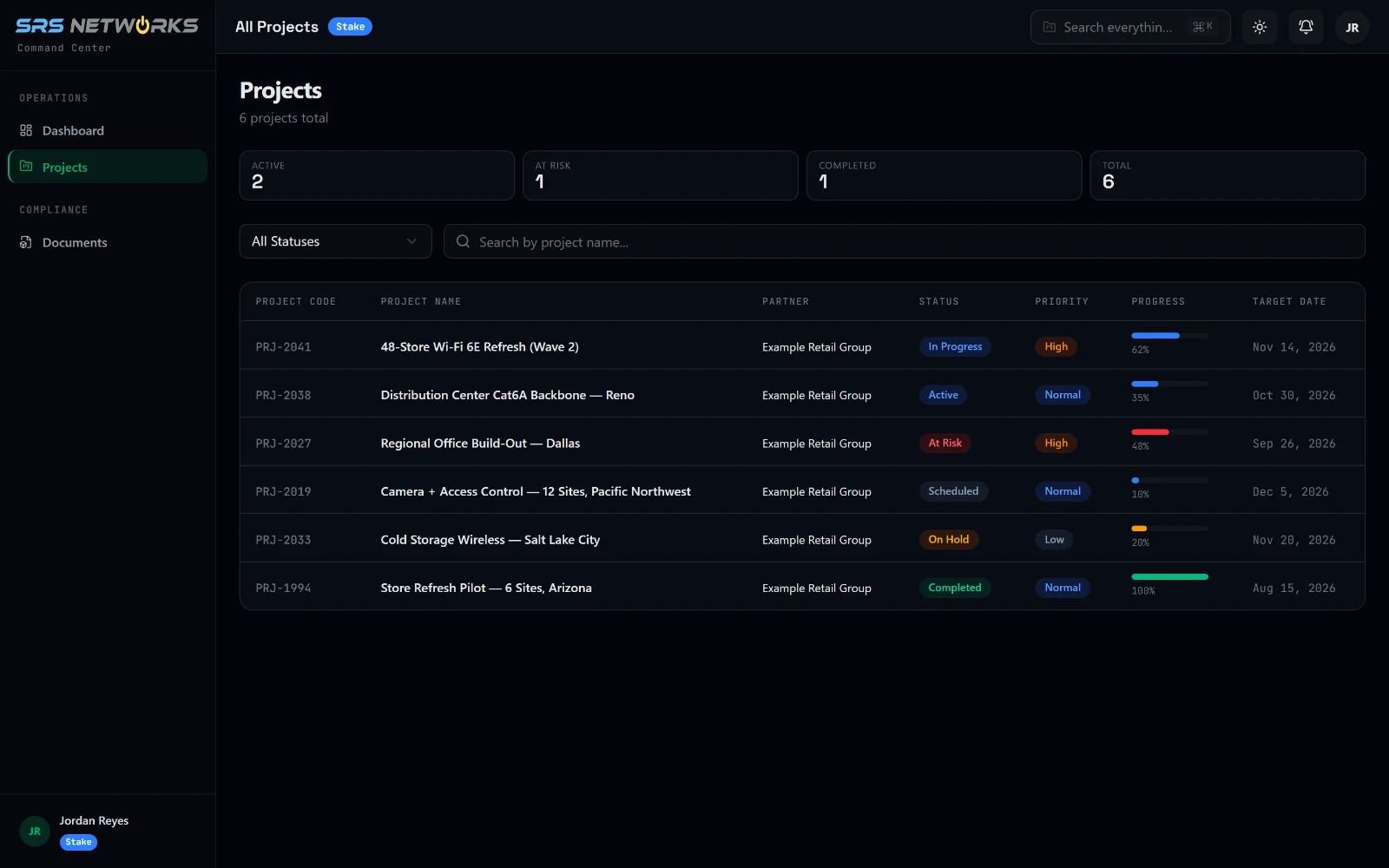
Real screen from the platform. Client stakeholder view, sample program data.
Inside the Command Center
Real screens from the platform, shown in the client stakeholder view with sample program data. This is what your team sees the day access is provisioned: the same screens your SRS project manager works from.
Every program on one screen
Status, priority, progress, and target date for each program in your portfolio. Filter by status or search by name, then click a row to open the project.
Platform Features Built for Enterprise Rollouts
Every feature in the Command Center was designed around the real-world needs of enterprise program managers, operations teams, and executive sponsors overseeing large-scale deployments.
Executive Dashboard
A single-pane-of-glass view across your entire program. See total sites, completion percentages, in-flight deployments, and upcoming activations - all updated in real time.
- Portfolio-level rollup
- Drill-down by region, state, or site
- Custom KPI widgets
Live Site Status Map
Color-coded geographic map showing every site's real-time deployment status. Instantly identify which locations are complete, in progress, pending, or flagged for issues.
- Interactive U.S. map
- Status filtering (complete / active / pending / blocked)
- Click-to-detail site cards
Photo Documentation Feed
Field technicians upload timestamped, geo-tagged photos for every task milestone. Clients can audit work quality at any site without being on the ground.
- Milestone-linked photos
- Before/after comparison
- Downloadable for audits
Task & Milestone Tracking
Every phase and sub-task from the deployment playbook is tracked as a discrete milestone. Completion of each milestone automatically advances the site's overall progress score.
- Phase-by-phase progress
- Dependent task logic
- Field tech sign-off capture
Alerting & Escalation
Configurable alerts notify project managers and client stakeholders when milestones are delayed, sites are blocked, or hardware shipments are flagged. Nothing slips through unnoticed.
- Email and in-app notifications
- Escalation paths by severity
- SLA countdown timers
Document Vault
All project documents - SOW, network diagrams, cable schedules, test results, and as-built packages - are stored and versioned by site. Full audit trail from day one.
- Per-site document library
- Version history
- Client-downloadable at closeout
Progress & Performance Reports
Automated weekly and on-demand reports summarize completion rates, deployment velocity, issue resolution times, and quality metrics across the full program.
- Scheduled email delivery
- PDF and CSV export
- Custom date range filtering
Integrated Communication Log
Every comment, decision, and change-order discussion is logged against the relevant site record. One searchable history, no lost email chains.
- Threaded notes per site
- Change-order tracking
- Stakeholder visibility controls
How the Command Center Works Across Your Program
From day one of project intake to final closeout, every stakeholder and field technician works through a single coordinated platform.
Project Intake
Your program is structured in the platform: sites loaded, milestones configured, teams assigned, and stakeholder access provisioned before deployment begins.
Logistics Sync
Hardware shipments are tracked in the system. Delivery confirmations trigger field crew scheduling and automatically update site status from 'pending' to 'ready for deployment.'
Field Execution
On-site technicians use the mobile interface to check off tasks, upload photos, log notes, and flag issues in real time as each deployment milestone is completed.
Stakeholder Visibility
Client stakeholders have read access to their program dashboard. They see live status updates, photo evidence, and progress reports without needing to contact the project manager.
Issue Resolution Loop
Blocked sites trigger automatic escalation. The project manager receives an alert, resolves the issue, and closes the loop - with all actions logged for accountability.
Closeout & Archive
At project completion, the platform auto-packages the as-built documentation set for client download. The site record is archived with full history retained for future reference.
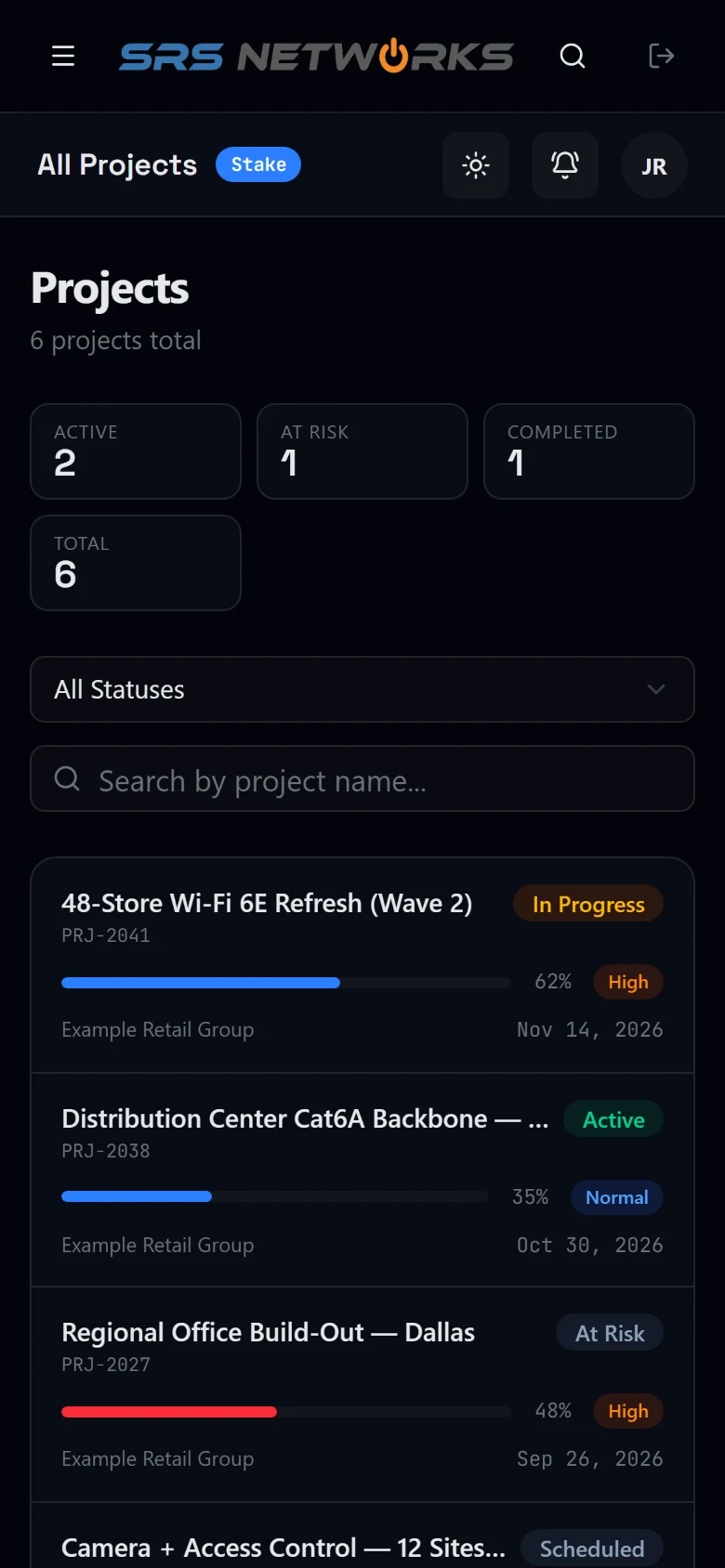
The same program on a phone. Stakeholders check status from anywhere; field crews work from the mobile interface on site.
Your Site History Does Not End When The Project Does
Photos attach to the site, not to the project that paid for them. The survey you bought in 2026 is still on the record when you remodel the same building in 2029, flagged separately from the install roll so you are not scrolling two hundred shots to find the closet as it was found.
Every later dispatch writes back to the same timeline. Download the survey set or the whole site, any time, and take it with you if the working relationship ends.
How Site Photo Documentation Works- Site survey photos flagged and kept, not discarded at closeout
- Every shot tagged to its closet, so you filter to one IDF instead of scrolling the building
- One timeline per address across every project and service call
- Timestamped on upload, scoped to your organization only
- Download by site or across the portfolio whenever you want it
Role-Based Access for Every Stakeholder
Every user type sees exactly what they need - and nothing they don't. Access is provisioned by your SRS project manager at program kickoff.
Executive Sponsor
- Portfolio-level dashboard
- Program completion metrics
- Regional performance summaries
- Executive PDF reports
Program Manager
- All sites and full drill-down
- Issue queue and escalation inbox
- Change-order approvals
- Full document vault
Site Stakeholder
- Individual site dashboard
- Photo documentation feed
- Milestone progress view
- As-built download at closeout
Field Technician
- Assigned site task list
- Mobile task check-off
- Photo upload per milestone
- Field notes and flagging
Security & Compliance You Can Trust
The Command Center handles sensitive project data for enterprise clients in banking, healthcare, and government. Our platform is built with security-first architecture: every access event is logged, all data is encrypted in transit and at rest, and role-based controls ensure users can only access what they're authorized to see.
For regulated clients, we can provide a full security overview and data handling documentation as part of your vendor assessment process. Contact your SRS project manager to request these materials.
Resolve the scope before requesting bids
- Keep site survey photos available
Define photo ownership, permitted access and export requirements in the closeout package. This is public planning guidance; project records remain access controlled.
- Define project visibility requirements
Agree which site milestones, exceptions and field records the project team needs to review.
See the Command Center in Action
Request a live demo with your SRS Networks account team and see how our platform transforms rollout visibility for enterprise programs. No commitment required.